Japan Tax Season: Organize Receipts into
a Spreadsheet in One Afternoon
The real bottleneck in Japan's February-to-March tax season isn't the midnight scramble to enter receipts into freee or Yayoi. It's the assumption built into every Japanese accounting app: that you've been scanning receipts one at a time all year. When the NTA reports 8.24 million people filed their own kakutei shinkoku without a licensed tax accountant, what that number doesn't say is how many of them spent a full weekend in front of a screen, feeding a year of tax season receipts through an interface that wasn't designed for a backlog.
Key Takeaways
- 150 receipts sit in a shoebox every January, and the guilt you feel (I should have scanned monthly) mirrors the experience of 8.24 million Japanese taxpayers who file their own kakutei shinkoku (確定申告, annual income tax return) each year.
- Japan's accounting tools (freee, Yayoi, MoneyForward) share an assumption that sinks the year-end sprint: you've been scanning receipts weekly all year, a workflow pattern that millions of self-filers almost never follow.
- An afternoon replaces a weekend when you define your columns once (date, vendor, both consumption tax subtotals at 8% and 10%, description, expense category) and ImageToTable.ai extracts 150 receipts (領収書, ryoshusho) in a single batch, converting era dates (令和8年 → 2026) and auto-categorizing from the description text while you validate instead of type. Emailed receipts can join the same batch on their own.
The 30-Day Window That Catches Everyone the Same Way
Japan's kakutei shinkoku, the final tax return (確定申告), has a fixed filing window: February 16 through March 15 every year. If March 15 falls on a weekend, the deadline extends to the following Monday. In 2027, March 15 is a Monday, so the deadline stands. Either way, you get roughly 30 days to compile a year's worth of income and expense records, calculate your tax liability, and submit. Penalties for late filing run from 5% to 20% of the tax owed, plus delinquency interest.
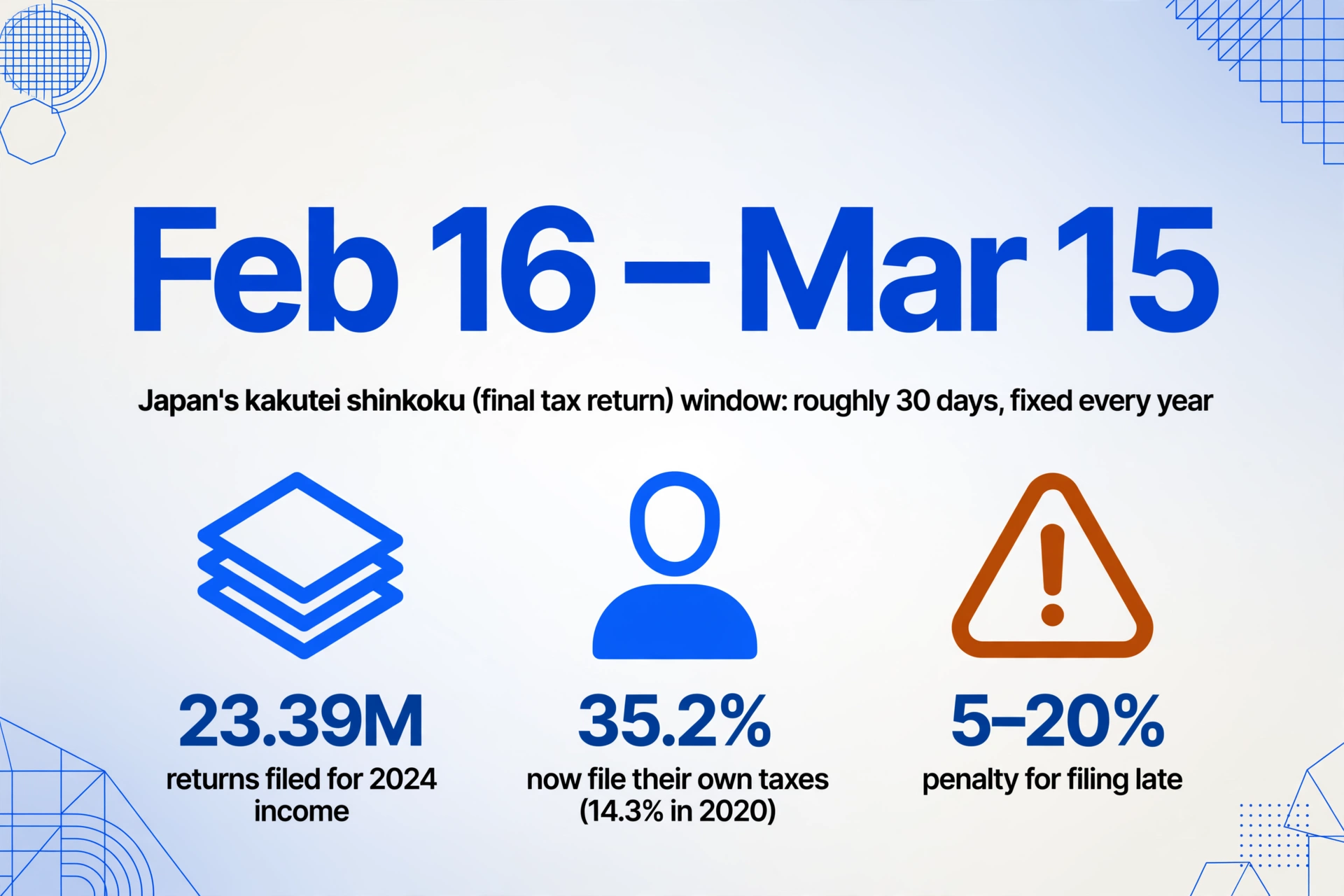
According to the National Tax Agency's 2025 report, 23.39 million tax returns were filed for 2024 income. Of those, 13.29 million were filed via e-Tax from home, and 8.24 million were transmitted by taxpayers themselves — not by certified public tax accountants (CPTAs) or payroll departments. Another 4.08 million people filed using a smartphone. The share of self-filers has grown steadily, from 14.3% of all filers in 2020 to 35.2% in 2024. More people are doing their own taxes. More people are facing the receipt pile alone.
Japan's freelance population, per Cabinet Secretariat estimates, has reached 4.62 million — spanning sole proprietors (個人事業主), one-person company presidents, and parallel workers with side businesses. Small businesses with 20 or fewer employees account for 84.5% of all enterprises (Ministry of Internal Affairs and Communications, Economic Census). These millions of people share one experience every January: opening a drawer, shoebox, or envelope and staring at a year's worth of receipts (領収書, ryoshusho) they meant to process monthly.
At 150 receipts — fewer than three per week — with an average 60-second entry time and 15 seconds of format-switching cost per receipt, manual data entry consumes over 3 hours. Add the era-date conversions, the dual-rate tax splitting for each receipt issued after October 2019, and the error correction, and a full workday disappears into a task that generates no revenue.
Why "I'll Do It Monthly" Fails More Often Than Not
Every Japanese accounting blog and tax office guide gives the same advice on Japan receipt organization: scan receipts as they arrive, enter them into your accounting software weekly, and organize by month. This is correct advice. It is also advice that the accountants, bookkeepers, and software marketing teams behind it consistently underestimate the difficulty of following.
The reality for a freelance designer, translator, or IT consultant is that a receipt arrives at the worst possible moment: you're finishing a deliverable, you're on the train, you're eating. The receipt goes into a wallet, then into a drawer, then into the "I'll batch this later" pile. Twelve months of "later" is how 150 receipts accumulate. This isn't laziness — it's a workload mismatch. The accounting workflow that Japanese cloud platforms optimize for is steady-state bookkeeping: one transaction at a time, spread across the year. The reality many freelancers face is a year-end backlog that the "scan as you go" interface wasn't designed to handle.
On Japan's Q&A platform Qiita, a user testing freee's receipt OCR reported approximately 20% accuracy on the amount field of a handwritten receipt — four digits reduced to two, with only one digit correct. The 2026 cross-tool comparison by Skill Pass tested five receipt-scanning tools against the same set of receipts and concluded: "No tool achieves 100% automatic completion." MoneyForward's Cloud Expenses service caps batch uploads at 50 files per session. freee's File Box accepts PDF, JPEG, and PNG under 10MB each. Yayoi's dedicated receipt app processes images on its servers before syncing to the accounting platform. All three work. All three assume you're feeding them receipts as you go, not as you catch up.
The gap is structural. A tool designed for steady weekly entry has no fast path for a year's backlog, so the person who waits until late January ends up performing 150 serial operations under deadline pressure. What closes the gap is a workflow built around the backlog itself: one batch, one afternoon.
The Spreadsheet-First Approach to Year-End Receipt Triage
The conventional workflow during tax season: open your accounting app, snap a receipt photo on your phone, wait for OCR, verify the extracted fields, accept or correct, move to the next receipt. Repeat 150 times. The bottleneck isn't any individual step. It's that you perform all of them serially.
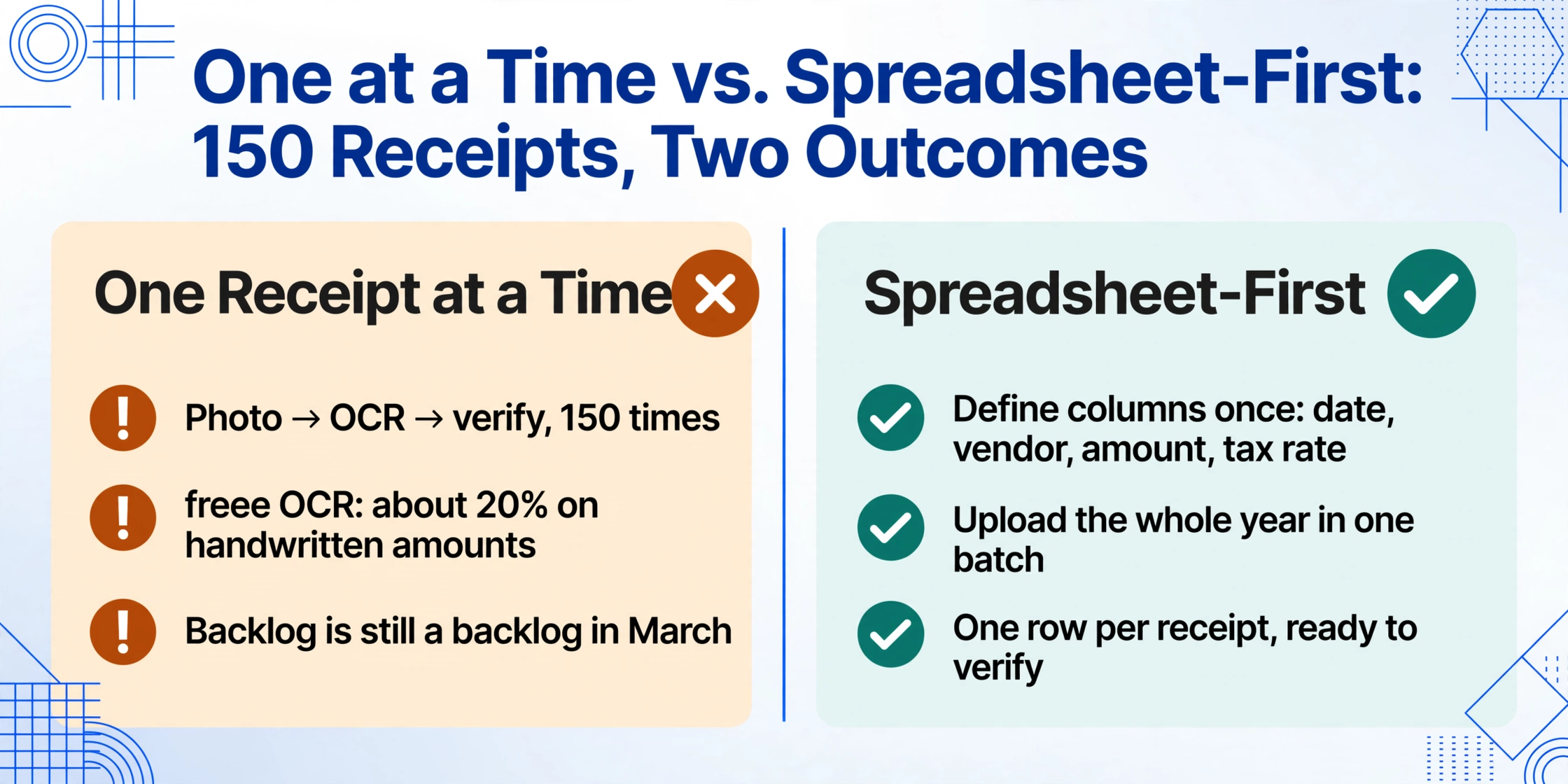
An alternative that aligns better with a year-end backlog is to separate extraction from accounting entry. Instead of feeding receipts into your accounting software one at a time, you extract the whole pile of tax season receipts into a single spreadsheet, then import or reference it when preparing your tax return. This inverts the workflow: the batch step happens up front rather than as a linear chore you drag yourself through all year.
This approach is enabled by column-name extraction: you define the data fields you want — date, vendor, total amount, 10% taxable subtotal, 8% taxable subtotal, description of purpose (但し書き), expense category — once. Then you upload every receipt you've accumulated in a single batch. The AI reads each document, locates the values matching your column names by understanding what they mean (not by matching coordinates on a template), and outputs one spreadsheet where each row is a receipt. The same column definition works across a convenience-store thermal slip from Lawson, a handwritten receipt from a small restaurant, and an Amazon Japan email PDF — no per-vendor setup.
A computed column can convert Japanese era dates (令和8年6月15日 → 2026-06-15) during extraction, so you don't spend 30 seconds per receipt doing date math in Excel. For a deeper explanation of how column-name extraction handles the specific structural challenges of Japanese receipts, from dual tax rates to era dates and the description of purpose, see our guide to extracting receipt data into Excel.
An inferred column, where the AI makes a classification judgment based on document content, can auto-categorize expenses. Define a column like Expense Category (勘定科目) (Options: 旅費交通費/接待交際費/消耗品費/通信費/地代家賃/その他) and the AI reads the description of purpose to determine which category applies. A taxi receipt gets categorized as travel expenses, a restaurant receipt from a client meeting as entertainment expenses. Extraction and classification happen in the same pass.
150 receipts. One column definition. One upload. One spreadsheet. The extraction processes in minutes. What remains is validation — sorting by amount, scanning outliers, reclassifying uncertain categories — which for a 150-receipt batch takes roughly 30 minutes. Total time elapsed: an afternoon, not a weekend.
One-Afternoon Workflow: From Paper Stack to Tax-Ready Spreadsheet
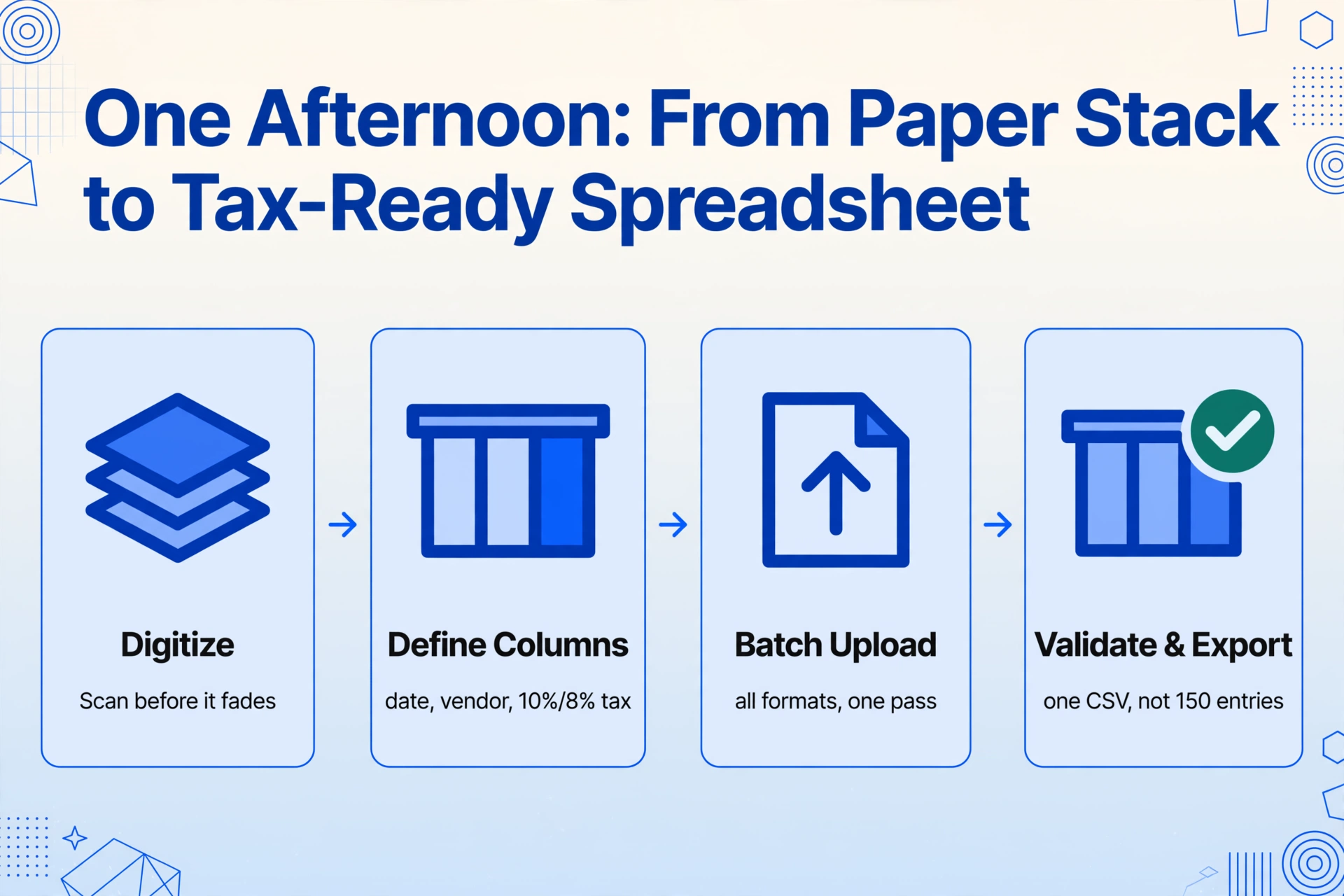
Here's a concrete timeline for turning a year of accumulated receipts into a spreadsheet you can use directly for kakutei shinkoku — whether you're filing via freee, Yayoi (弥生), MoneyForward, or handing a CSV to your licensed tax accountant (税理士).
Hour 0–1: Digitize Everything
Before any extraction, every receipt needs to be in digital format. For paper receipts, use your phone camera: place the receipt flat on a dark surface, make sure the full receipt is visible (issuer name through total amount), and avoid hand shadows. Thermal paper receipts from convenience stores and restaurants begin to fade within 6–12 months, and the fade is chemical and irreversible, so a receipt that is legible today may be blank by next season. If you're doing this in February and a receipt from last July is already faint gray on white, capture it now.
For receipts you received electronically, from Amazon Japan order confirmations to utility PDFs and emailed invoices, save them to a single folder. If you have time, a naming convention like YYYY-MM-DD_Vendor.pdf makes each file traceable. If you don't, the extraction tool preserves the original filename in the output spreadsheet, so you can still find the source file from any row.
If those electronic receipts mostly arrive by email, you can skip the download-and-file step entirely. ImageToTable.ai gives each account an Email Inbox address: forward a utility bill or a supplier invoice to it and the attachment lands in your processing queue. Switch on auto-process with a saved template and it is extracted on arrival, so that part of the year's pile is already a spreadsheet before you sit down.
Under Japan's Electronic Bookkeeping Act (電子帳簿保存法), in full enforcement since January 2024, any receipt received electronically — email PDF, website download, app screenshot — must be stored as electronic data. You cannot print it out and keep only the paper. For paper receipts you digitize by scanning, the scanned copy serves as supporting evidence; the original can be discarded under scanner preservation rules if scanned within two months plus seven business days of receipt and your office has adopted the required internal processing rules. The digitization step satisfies compliance requirements as a side effect.
Hour 1–1:15: Define Your Columns
This 15-minute step determines the quality of everything that follows. Define exactly the fields you need — no more, no less. For a typical freelancer or sole proprietor filing the Blue Return (青色申告):
| Column Name | Purpose | Type |
|---|---|---|
Date (日付) | Transaction date, for sorting by tax year | Direct extraction |
Vendor (発行者) | Who you paid; maps to counterparty (取引先) in accounting software | Direct extraction |
Total Amount (金額) | Total paid, tax-inclusive | Direct extraction |
10% Taxable Subtotal (10%対象額) | Subtotal for standard-rate items | Direct extraction |
8% Taxable Subtotal (8%対象額) | Subtotal for reduced-rate items (food, newspapers) | Direct extraction |
Description (但し書き) | What the payment was for; audit evidence | Direct extraction |
Expense Category (勘定科目) | Options: travel expenses (旅費交通費), entertainment (接待交際費), supplies (消耗品費), communications (通信費), rent (地代家賃), purchases (仕入高), outsourcing (外注費), other (その他) | Inferred: AI reads description and classifies |
For White Return (白色申告) filers, the requirements are simpler: Date, Vendor, Amount, and a broad expense category typically suffice. White Return uses the Statement of Earnings and Expenses (収支内訳書) rather than the Blue Return Financial Statement (青色申告決算書), and the NTA does not require the same level of granularity in the reporting.
If you need the detailed column logic, including how to design inferred columns for the standard Japanese expense account categories and how to handle the Qualified Invoice System (インボイス制度) tax breakdown requirements, the batch-processing guide for Japanese freelancer receipts covers the column design in depth.
Hour 1:15–1:20: Upload and Extract
Upload all receipt files in a single batch — JPG, PNG, or PDF. The AI processes each one, locating the values matching your defined columns, and populates a spreadsheet. Processing takes a few seconds per page. A 150-receipt batch completes in minutes.
The output includes a source-file reference for each row — you can click from any spreadsheet cell back to the original receipt image. This traceability satisfies the Electronic Bookkeeping Act requirement that records be searchable by date, amount, and counterparty.
Files are processed securely and not stored.
Hour 1:20–4:00: Validate the Output
No extraction tool achieves 100% accuracy on every receipt. The goal of a year-end batch sprint is to shift human effort from "type every field from scratch" to "spot-check the outliers." A targeted 30-minute validation routine for the remaining time:
- Sort by Amount (descending) and verify the top 10 rows. These are your largest expenses and carry the highest audit risk. A ¥45,000 expense miscategorized as office supplies instead of equipment may trigger different depreciation treatment under NTA rules. Check each against its original receipt image.
- Scan the Category column for any "other" classifications. The AI uses this catch-all when it can't confidently determine the category. Reclassify these manually — usually fewer than 10% of receipts in a batch.
- Sort by Date and verify no entries fall outside the current tax year (January 1–December 31). A January 2027 receipt does not belong in your 2026 filing.
- For Blue Return filers: spot-check the tax subtotal sums. The 10% taxable subtotal plus the 8% taxable subtotal should roughly equal the total amount. A discrepancy beyond a few hundred yen flags a potential extraction error on that receipt.
After validation, you have a spreadsheet where every row is a verified receipt entry — date, vendor, amount, tax breakdown, description, and category. This is the output that took a full workday to produce by hand.
Blue Return vs. White Return: Tailoring the Spreadsheet to Your Filing Type
The choice between Blue Return (青色申告) and White Return (白色申告) determines both the columns you need and the depth of validation you should perform. Both share the same deadline, March 15, but the data requirements differ sharply.
Blue Return offers a special deduction of up to ¥650,000 for filers who submit electronically via e-Tax and maintain double-entry bookkeeping (複式簿記). From 2027, the maximum deduction increases to ¥750,000 for those combining e-Tax with "excellent electronic records," while paper-only filers are limited to ¥100,000. For a sole proprietor with ¥4 million in business income, the ¥650,000 deduction at the 20% marginal tax rate means roughly ¥130,000 in income tax savings, plus approximately ¥65,000 in reduced residence tax. But it requires granular records: each receipt split by tax rate, each transaction mapped to a specific expense account category (勘定科目), and all records retained for 7 years.
White Return is simpler — cash-basis records, no balance sheet required, receipt retention for 5 years — but offers no special deduction and no loss carryforward. The data requirements are lighter, which means a simpler column set and less validation time.
Blue Return's ¥650,000 deduction justifies an extra hour of validation. At the 20% marginal rate, every ¥10,000 expense you miss because a faded receipt wasn't entered is ¥2,000 in unnecessary tax. If one missed receipt costs ¥2,000 in tax, finding ten missed receipts during validation pays for the entire afternoon.
From Spreadsheet to Kakutei Shinkoku: Importing into Your Accounting Software
Once your spreadsheet is validated, you have two paths to filing:
Path 1: CSV import into accounting software. freee, Yayoi, and MoneyForward all support CSV import for transaction data. Export your spreadsheet as CSV, match the column order to your platform's import format, and import one file instead of entering 150 individual receipts. freee's import template expects columns for date, amount, account item (勘定科目), description (摘要), and counterparty (取引先). MoneyForward and Yayoi follow similar column conventions. Your batch extraction output maps directly to these fields — the import step replaces 150 individual receipt entries with one CSV upload.
Path 2: Direct use with e-Tax. If you prepare your tax return through the NTA's online filing assistance tool (確定申告書等作成コーナー), your validated spreadsheet serves as the source document for entering expense totals by category. The spreadsheet gives you the categorized totals you need; the e-Tax interface handles the form logic. For Blue Return filers, the spreadsheet data populates your Blue Return Financial Statement's expense section.
Either path satisfies the Electronic Bookkeeping Act searchability requirements — your spreadsheet is searchable by date (sort the Date column), by amount (sort the Amount column), and by counterparty (filter by Vendor). Combined with organized digital folders of original receipt images, linked from each spreadsheet row, you have a retrievable audit trail.
Frequently Asked Questions
Am I too late if I'm starting in February?
No. The filing window runs February 16 through March 15 (or the following Monday if the 15th is a weekend). If you start in early February, you have roughly six weeks. The workflow described above — digitize, define columns, batch upload, validate — takes one dedicated afternoon. You're not too late. You have time to do it right, not just fast.
What if my thermal paper receipts have already faded?
Thermal paper receipts begin to degrade within 6–12 months. If the text is faint but still legible, AI vision models often handle it better than traditional OCR because they process the image holistically — inferring text from surrounding context rather than relying solely on pixel contrast. If the receipt is mostly blank, no extraction tool can recover data that a human eye can't see. The practical lesson: digitize before the year ends next time. For now, extract what you can from the legible ones and cross-reference the faded entries against your bank statements or credit card records to fill in missing amounts and dates.
Does batch extraction work on handwritten receipts?
Partially. AI vision models handle clear, block-style handwriting on receipts better than traditional template-based OCR because they read for meaning, not by matching pixel positions. Cursive or stylized handwritten kanji — particularly from older receipts written with a brush pen — will have lower extraction accuracy. If handwritten receipts represent more than 20–30% of your yearly volume, budget extra validation time for those specific receipts. Spot-check them manually: sort your output and scan the vendor column for small restaurants, individual service providers, and freelance peers who likely wrote by hand.
How accurately can it split 8% and 10% consumption tax?
When the receipt clearly labels the 10% and 8% subtotals separately — as most chain-store and convenience-store receipts from 2023 onward do, required under the Qualified Invoice System (インボイス制度) — AI extraction handles the split reliably. When a receipt shows only a single total without a tax breakdown (common on older or small-vendor handwritten receipts), the AI cannot split what isn't printed. In these cases, calculate the split manually based on item content: food items at 8%, other items at 10%. This typically affects a minority of receipts in a batch.
Does this workflow satisfy Electronic Bookkeeping Act (電子帳簿保存法) requirements?
Yes, provided you maintain the workflow outputs properly. The Electronic Bookkeeping Act requires that electronically stored documents be searchable by date, amount, and counterparty, and that the storage system prevents unauthorized alterations. A validated spreadsheet with sortable columns satisfies the searchability requirement. Organized digital folders of original receipt images, linked from each spreadsheet row, provide the audit trail. The two-year grace period for paper fallback ended January 1, 2024; if you received a receipt electronically (email PDF, website download), keeping only a printout is non-compliant. Your batch extraction workflow produces a digital archive as a natural output. For the full set of requirements, see our guide to Japan's Electronic Bookkeeping Act.
Can this really be done in one afternoon?
For 150 receipts: yes, with the caveat that "one afternoon" means approximately 4 hours: about one hour for digitizing (if you have a large paper backlog), 15 minutes for column setup, a few minutes for processing, and roughly 30 minutes for targeted validation. The remaining time is buffer for edge cases: faded receipts that need cross-referencing, handwritten entries that need manual verification, and the inevitable receipt you realize is missing. If your receipts are already digital (most purchases were online or you've been scanning intermittently), the digitization hour shrinks to a file-organization minute, and the total time drops closer to 2 hours.
Why This February's Receipts Don't Need to Look Like Last Year's
The question Japanese freelancers trade each January is not about deduction strategies or filing deadlines. In community forums and coworking spaces it is simpler: "How many receipts do you still need to enter?" The answer usually earns a grimace. No single receipt is hard to process. The weight comes from doing 150 of them one after another, through an interface that treats each one as a fresh start.
The spreadsheet-first approach doesn't eliminate the need to verify your data. Verification is a necessary step for every filer, regardless of tool. What it eliminates is the creation of data from scratch: typing "2026-08-15" for the 130th time, squinting at a description of purpose to decide whether a receipt says "meal expenses" (お食事代として) or "snack expenses" (お菓子代として), and splitting the 10% and 8% tax subtotals on a thermal receipt that has been fading in a drawer since July.
Test the workflow on your own receipts. See if a stack of receipts that consumed a full Saturday last year becomes a spreadsheet you validate over coffee — and if the six hours you reclaim are spent on the work that actually earns you money, not the paperwork that documents it.