The 90-Day Countdown: HR's Employment
Contract Audit Before Deadlines
A December 31 employment contract with a 90-day non-renewal notice clause carries an operational deadline of October 2 — and October 2 is also the week most HR departments first open their contract folders for the annual audit. The calendar gap between when the notice deadline expires and when the review actually starts is not a hypothetical risk. It is a recurring structural reality in organizations where contract data lives in PDFs scattered across shared drives, and the extraction step — reading dates out of documents and populating a tracking spreadsheet — consumes the same hours the audit itself was supposed to use.
Key Takeaways
- Every employment contract with a 90-day notice period has a hidden deadline — the date 90 days before expiry — and in most HR departments, nobody calculates that date until the window is already half closed.
- The FTC non-compete rule is procedurally dead but its underlying evidence — 30 million workers subject to noncompetes, $524 per year in suppressed wages — means state-level enforcement and contract clause scrutiny are accelerating anyway, making this year's contract audit different from last year's.
- ImageToTable.ai reads 50 employment contracts into a reviewable spreadsheet in the time it takes to manually type six date fields from one PDF — turning the extraction bottleneck from a multi-day data-entry grind into a 15-minute verification step that leaves the audit window intact.
Why the Real Deadline Passed Before You Opened the First PDF
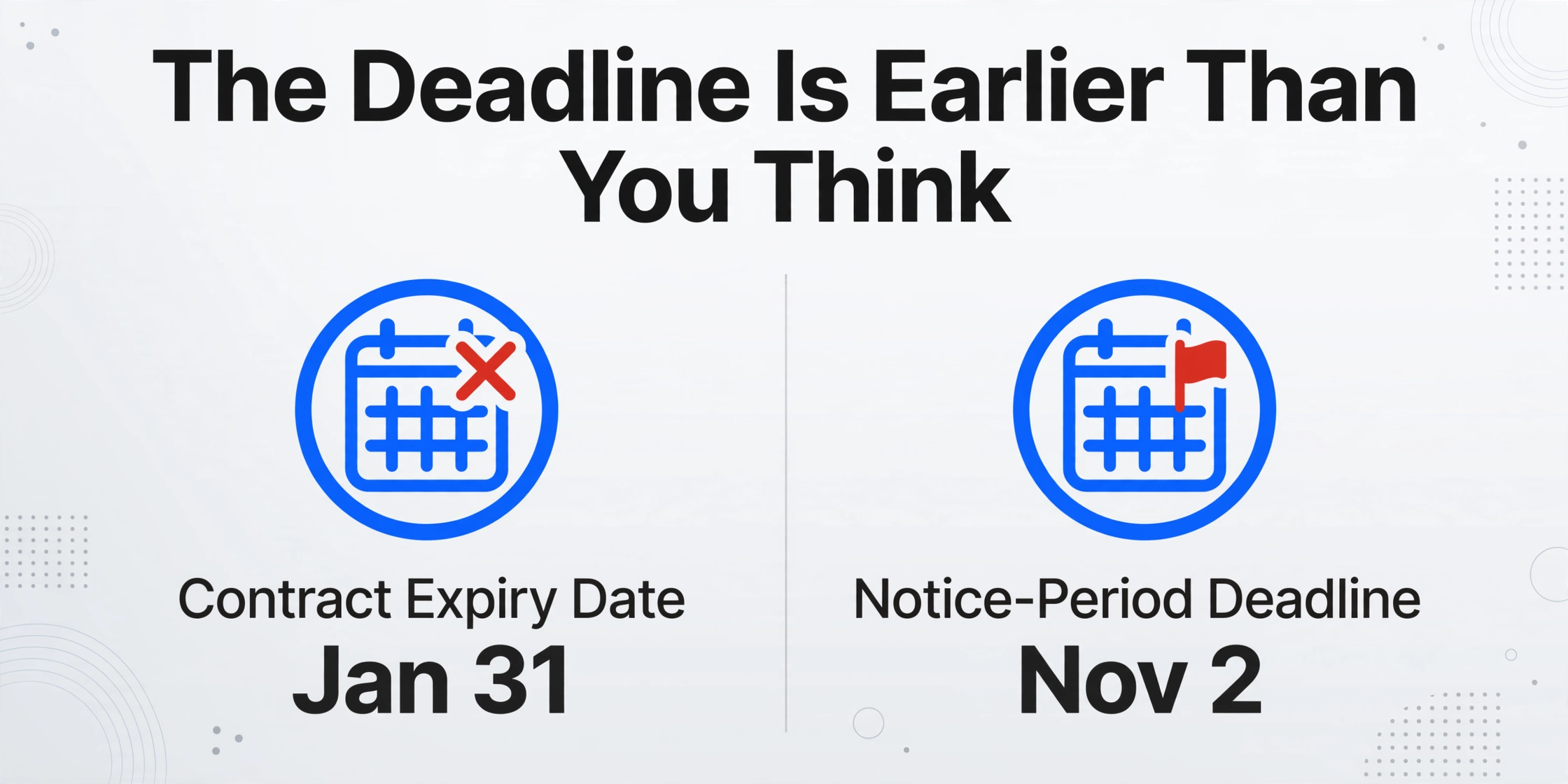
Every HR professional knows the contract expiry date. It is the number in the tracking spreadsheet, the value highlighted yellow in conditional formatting, the date the Outlook reminder is set for. The problem is that the expiry date is not the date the employer needs to act. The date the employer needs to act is the expiry date minus the notice period specified in the contract.
A 12-month fixed-term employment contract signed February 1 expires January 31 of the following year. If the contract specifies a 90-day non-renewal notice period, the employer must decide whether to renew, convert, or terminate by November 2 — not January 31. If the contract specifies a 60-day notice period, the deadline is December 2. If the contract specifies 30 days, January 1. Every notice period shifts the operational deadline backward from the expiry date. The longer the notice period, the earlier the decision window closes — and the earlier HR must have extracted, organized, and reviewed the contract terms that inform that decision.
This backward math is not complex. What makes it operationally dangerous is that most HR teams do not apply it systematically because the notice period clause — the number of days, whether it applies to non-renewal or only to termination — lives inside the contract PDF, not in a database field. To calculate the notice-period deadline, someone must open the contract, read the notice clause, extract the number of days, subtract it from the expiry date, and enter the resulting date into a tracking spreadsheet. For a single contract, this takes two minutes. For 40 contracts — a typical fixed-term portfolio for a mid-market company with 500 employees — it takes 80 minutes of mechanical date arithmetic. During that 80 minutes, a notice deadline may expire. It almost certainly will if the 80 minutes begin on November 1 and the first contract opened has a 90-day notice period.
The expiry date answers "when does the contract end?" The notice-period deadline answers "when does the decision to renew or not renew need to be made?" These are different questions with different answers, and the answer to the second question is not stored anywhere in the HRIS.
This is why contract renewal season is fundamentally a timing problem before it is a compliance problem. Organizations that start their annual audit 60 days before year-end — a standard project timeline that feels responsible — have already missed the deadline for every contract with a notice period longer than 60 days. The audit window that felt generous in September turns out to have closed in August.
Six Dates Your HRIS Won't Track — And Your Annual Audit Can't Skip
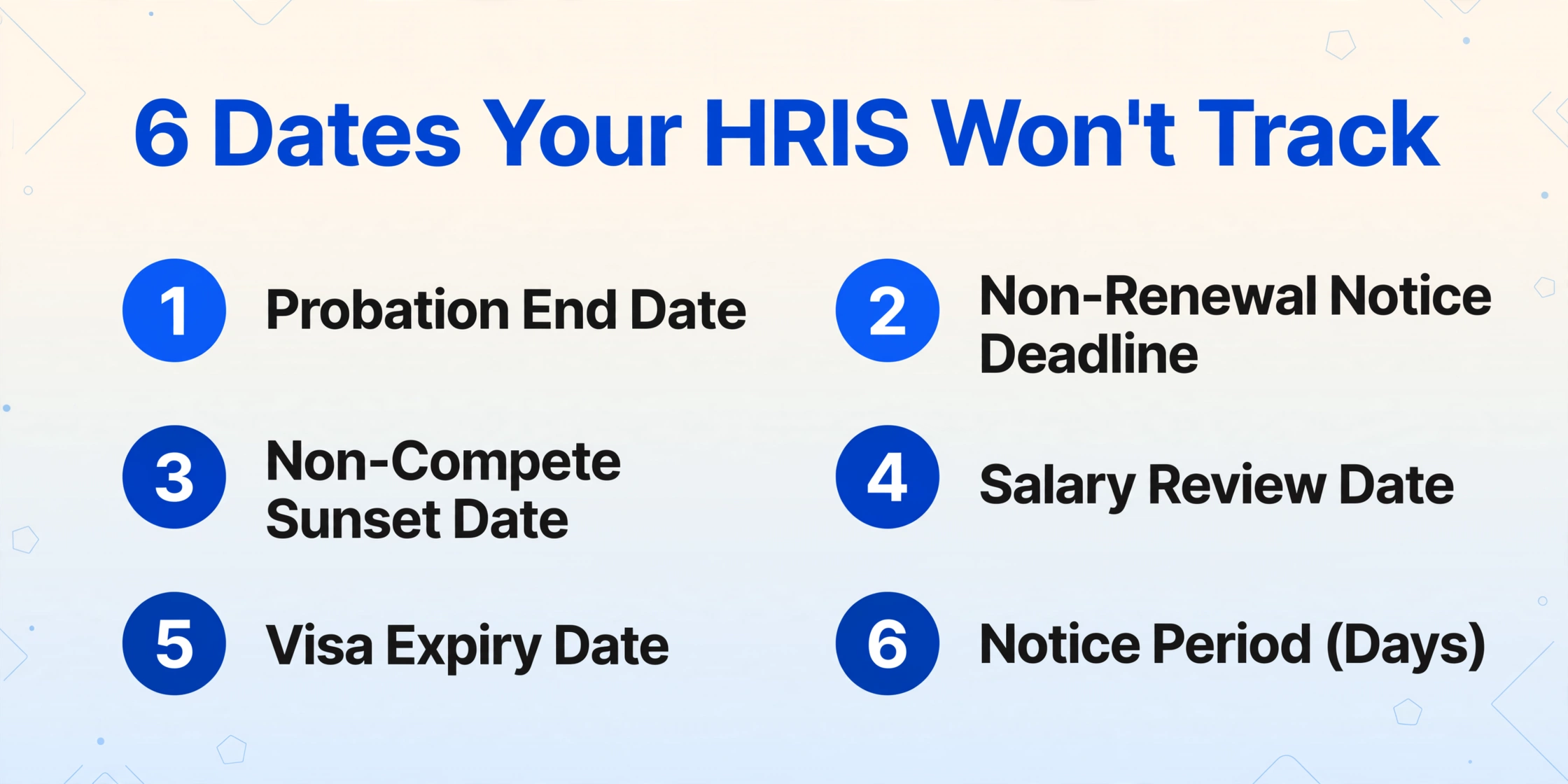
The contract expiry date gets all the attention because it is the most visible. But an employment contract carries multiple date types, each with distinct compliance exposure, and most of them have no corresponding field in Workday, BambooHR, or ADP Workforce Now. During the annual audit, skipping any of these dates creates a gap that compounds silently until the next renewal cycle — or the next regulatory inquiry.
Probation period end date. New hires typically serve a 3-to-6-month probation before their employment status converts from provisional to permanent. The probation end date triggers a mandatory evaluation — the manager must submit a review, and HR must either confirm permanent status, extend probation, or terminate. Miss the deadline by two weeks and the employee spent two unauthorized weeks in a status HR never formally confirmed. In an annual audit, the question is not just whether probation reviews were completed — it is whether the probation end dates stored in the tracking spreadsheet match the dates actually written in the signed offer letters. When those dates were typed by hand, the mismatch rate is rarely zero.
Non-renewal notice deadline. As discussed above, this is the expiry date minus the contract's notice period — typically 30, 60, or 90 days. Every contract carries its own notice clause, and the clause may specify different notice periods for employer-initiated non-renewal versus employee-initiated resignation. The audit must verify both.
Non-compete sunset date. Post-termination non-compete restrictions typically run 6 to 12 months. For employees who left the organization during the audit period, the audit should confirm when their non-compete expires — relevant for rehire eligibility, for responding to references, and for competitive hiring strategy. The FTC's 2024 rule banning noncompetes was blocked by a district court and its appeal was dismissed, but the underlying evidence the FTC assembled — 30 million workers subject to noncompetes, an estimated $524 per year in wage suppression per affected worker, and a projected 8,500 additional new businesses per year if noncompetes were eliminated — has accelerated state-level legislative activity. Several states strengthened their own non-compete restrictions in response. During this year's audit, non-compete clauses in employment contracts are under more scrutiny than they were a year ago, even without a federal ban in effect.
Salary review trigger date. Multi-year employment contracts often specify annual salary review dates. If the review date passes without action, the employer may be in breach of a contractual obligation — not a statutory violation, but a contract breach the employee can pursue. The audit should flag upcoming review dates that fall within the next audit cycle.
Visa or work authorization expiry. For H-1B, L-1, and TN visa holders, the employment contract term is directly tied to the visa petition period. If the contract approaches expiry without a renewal decision, the employer must evaluate whether a visa extension is required, whether the extension petition filing deadline allows enough processing time, and whether the job terms in the contract still match the terms in the original visa petition. A mismatch between contracted terms and petitioned terms is a USCIS compliance exposure that HR audit must catch.
Right-to-renew window. Some employment contracts grant the employee — not the employer — the option to renew for an additional term. The employee's right-to-renew window typically opens 60 to 90 days before the contract expiry. If HR does not notify the employee before the window closes, the employee loses a contractual right — and the employer gains a dispute.
| Date Field | In HRIS? | Compliance Exposure if Missed |
|---|---|---|
| Probation period end | No | Employee in unauthorized provisional status; manager review not triggered |
| Non-renewal notice deadline | No | Contract auto-renews by default; employer locked into unwanted term |
| Non-compete sunset | No | Rehire eligibility unclear; competitive restrictions extended in error |
| Salary review trigger | Sometimes — if compensation module tracks review cycles | Contractual breach; employee may claim backdated adjustment |
| Visa/work authorization expiry | Sometimes — if immigration module exists | USCIS compliance gap; out-of-status worker; I-9 violation |
| Employee right-to-renew window | No | Employee loses contractual renewal option; dispute ensues |
The HRIS captures what happened to the employee after they were hired. The employment contract encodes what will happen — on specific dates, under specific conditions. These two data structures face opposite directions, and the annual audit is the moment that gap becomes visible.
What Changed in Employment Law That Affects This Year's Review
The annual contract audit is not a mechanical exercise — you are not just verifying that dates are correct. You are checking whether contract terms remain compliant with current law, and what was compliant last year may not be compliant this year. Three regulatory developments from 2024-2025 shift the audit checklist.
The FTC non-compete rule: procedurally dead, substantively alive. The FTC issued a final rule on April 23, 2024, that would have banned virtually all worker non-compete agreements nationwide, with a narrow exception for senior executives earning more than $151,164 annually in policy-making positions. A federal district court in Texas blocked the rule on August 20, 2024, before it could take effect. The FTC appealed, and on September 5, 2025, took steps to dismiss that appeal — leaving the rule unenforceable. But the evidence the FTC compiled — 30 million workers, $524 per year in suppressed wages, an estimated 2.7% increase in new business formation if noncompetes were eliminated — has fueled state-level action. California, Oklahoma, North Dakota, and Minnesota already had strong non-compete restrictions. In 2024-2025, additional states introduced or passed legislation narrowing the scope of enforceable non-competes, particularly for low-wage workers and non-exempt employees. For the HR contract auditor, the practical question is: which of our active employment contracts contain non-compete clauses, and are those clauses still enforceable under the current law of the state where the employee works?
FLSA independent contractor classification rule. Effective March 11, 2024, the Department of Labor revised its guidance on distinguishing employees from independent contractors under the Fair Labor Standards Act, rescinding the 2021 rule that had favored a narrower set of factors. The new rule returns to a totality-of-the-circumstances test examining six factors, with the two "core" factors — the nature and degree of control over the work, and the worker's opportunity for profit or loss — carrying the most weight. For the contract audit, this means any contractor agreements or independent contractor engagement letters in the contract portfolio must be reviewed against the current classification standard, not the one that was in effect when the contract was originally signed. A worker classified as an independent contractor under the 2021 rule may no longer pass the 2024 test — and misclassification carries back-tax liability, overtime back-pay exposure, and potential FLSA recordkeeping violations under 29 CFR Part 516.
At-will status reversion on contract expiry. In 49 states — every state except Montana — employment is at-will by default, meaning either party can terminate the relationship at any time for any non-discriminatory reason. A signed employment contract with a defined term creates a temporary exception to at-will status: during the contract period, the employer is bound by the contract's termination provisions, notice requirements, and severance terms. When the contract expires and the employee continues working without a new signed agreement, their employment status silently reverts to at-will. If nobody in HR documented the reversion, the termination protections the employee believed they had under the contract may become the subject of a dispute — especially if the employer later terminates the employee without the notice or severance the expired contract would have required. The audit must identify every contract that has expired or will expire during the review period and verify that a formal status determination — renew, convert to permanent, or document the at-will reversion — was made and recorded.
Contract expiry is not just a calendar event. It is a legal status transition — from contract-protected to at-will — that affects termination rights, notice obligations, and severance entitlements. In most HR departments, the system that tracks this transition is the same spreadsheet that tracks office birthdays.
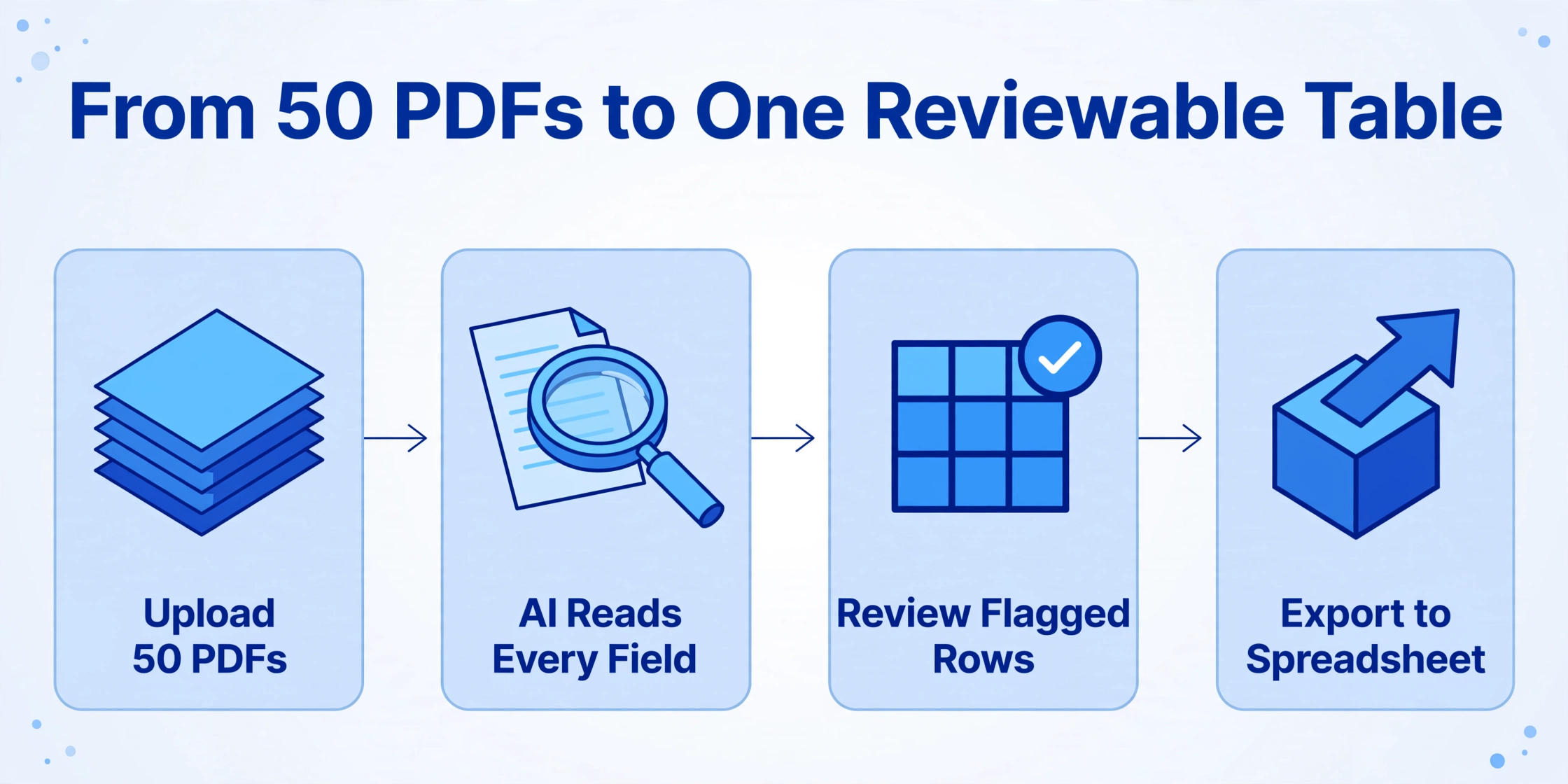
From 50 PDFs to One Reviewable Table: The Extraction-First Workflow
The audit itself — the legal review, the compliance check, the decision about renewal or non-renewal — requires judgment. Judgment requires reading. And reading, at the scale of 30 to 50 employment contracts, requires time. The bottleneck that kills the audit timeline is not the judgment step. It is the step that precedes it: getting the relevant data out of the PDFs and into a format where judgment can be applied efficiently.
For as long as this step has been manual — opening each contract PDF, locating each date field, typing its value into a tracking spreadsheet — the extraction phase has consumed the same hours budgeted for the review phase. An HR coordinator with 40 contracts to audit, each containing six date fields to extract, spends roughly 12 to 15 hours on data entry alone — assuming three minutes per contract to locate, read, and type each field. During those 15 hours of typing, a 90-day notice deadline on a December 31 contract — which closes on October 2 — may pass before anyone has read that particular contract's notice clause.
What changes this equation is column-name extraction: an AI-driven approach where you define the data fields you need as column headers — "Contract Start Date," "Contract Expiry Date," "Probation End Date," "Renewal Notice Period (Days)," "Non-Compete Duration (Months)," "Salary Review Date," "Visa Expiry Date" — and the AI reads each uploaded contract, locates the corresponding values wherever they appear on the page, and compiles everything into a single spreadsheet. The column names you enter become the headers of the output table — the same structure you would have built by hand, populated without the typing.
The mechanism is not template matching. It does not require you to train the system on sample documents, draw bounding boxes around field locations, or configure parsing rules. The AI reads the contract semantically — understanding that "the probationary period shall continue for a duration of six (6) months from the Effective Date" means the probation end date is the effective date plus 180 days, regardless of whether the clause appears on page 1 of a two-page offer letter or page 4 of a 12-page employment agreement with equity vesting schedules.
For the specific workflow of extracting key employment contract fields into a structured spreadsheet, this means the column schema you define once — the six date fields above, plus any clause indicators you want to flag (non-compete present, auto-renewal clause, right-to-renew by employee) — applies to every contract in the batch, regardless of format, length, or layout. An offer letter from a tech startup with equity vesting, a fixed-term agreement from a university with academic-year renewal terms, a contractor addendum with project-specific end dates, amendment letters that modify original contract dates — all read against the same column definitions in a single pass.
Files are processed securely and not stored.
The critical change is what happens to the HR coordinator's time budget. A manual audit of 40 contracts at 3 minutes per contract for date extraction consumes 12 hours — roughly a day and a half of pure data entry — before any legal review begins. With column-name extraction, the upload and processing step takes approximately 5 to 10 seconds per page. The output spreadsheet arrives with the same six date columns populated across all 40 contracts. The coordinator's job shifts from data entry to data verification: scanning the output table for flagged low-confidence fields, spot-checking dates against the original PDFs, and confirming that notice-period deadlines have been calculated correctly. Verification takes 30 to 45 minutes — not 12 hours — and the remaining time returns to the audit itself: reviewing clauses, checking compliance, making renewal decisions.
The extraction-first workflow does not eliminate the need for human review. It relocates the human effort from the mechanical task of reading dates off a page and typing them into Excel, to the judgment task of verifying extracted data and applying legal knowledge to it. That relocation — from mechanical to judgment — is what buys back the audit window before the notice-period deadlines close.
For HR teams managing seasonal hiring cycles or annual contractor onboarding, batch-extracting offer letters and contracts into an employee database scales the same principle: define columns once, process the full batch, verify the output, import into the HRIS. The spreadsheet — the tracking tool every HR department ends up building because no commercial product fills the gap — gets populated by extraction rather than by typing. Its error rate drops from whatever the keystroke error rate is across 240 manual entries (six fields times 40 contracts) to whatever the AI's confidence flags identify for review.
The spreadsheet itself remains, if the team wants it. What disappears is the part where maintaining it consumed the same hours that the audit needed. The structural gap between HRIS and CLM — the gap the employment contract timeline falls into, as analyzed in detail here — does not close. But the bridge across it stops being a keyboard and starts being an extraction pass.
FAQ
Which employment contract dates are legally required to track during an annual audit?
No single federal statute mandates a comprehensive list of employment contract dates for audit purposes. However, the FLSA's recordkeeping regulations (29 CFR Part 516) require employers to maintain records of the basis on which wages are computed for at least two years, and the contract salary terms, start date, and classification provisions are part of that basis. State laws vary — California, for example, requires written notice of wage rate and payday within seven days of hire — and a contract that expired without documentation of new terms creates an evidentiary gap. The practical minimum for an annual audit: contract start date, contract expiry date, notice-period deadline (calculated from the expiry date minus the notice period), probation end date (if applicable), non-compete duration and sunset date, and work authorization expiry for visa holders.
Can AI extraction handle offer letters that look completely different from formal employment agreements?
Yes, because column-name extraction reads documents semantically rather than matching templates. A one-page offer letter from a startup that says "Your start date will be March 15, 2026, and your employment will be at-will" and a 15-page university faculty employment agreement with sections numbered §3.1 through §12.4 are read against the same column definitions. The AI locates "Contract Start Date" in both documents by understanding that both texts describe an employment commencement date — not by expecting the date to appear in a specific position on a specific page format. The output table normalizes the extracted values into a uniform structure regardless of input document diversity.
What if some contracts have amendment letters that change the original dates?
Amendment letters create a versioning problem: the original contract says one expiry date, and a later amendment extends or shortens it. During the annual audit, reading only the original contract produces wrong data. The safest approach is to include amendment letters in the same extraction batch as the original contracts — either as separate uploads or merged into a single PDF — and to include a column like "Latest Amendment Date" in the extraction schema. The AI extracts dates from all documents in the batch, and the reviewer verifies which date applies. If the amendment letter changed the notice period from 60 days to 90 days, that change will appear in the extracted data and trigger the reviewer to recalculate the notice-period deadline accordingly.
How does the extraction output integrate with an existing HRIS?
The extraction output is a spreadsheet (Excel or CSV) — the universal data interchange format that every HRIS supports for bulk import. If your Workday, BambooHR, or ADP instance supports CSV upload for employee data updates, the extracted columns map to that upload template. If your team maintains a manual tracking spreadsheet, the extraction output replaces the data-entry step that populates it — the spreadsheet's structure stays the same, but its contents arrive by extraction rather than by typing. No integration connector or API access is required. The extraction step fills the gap between the contract PDF and whatever system your team uses to track what is in it.
What accuracy should we expect when extracting dates and clauses from employment contracts?
For clean, typed PDFs — the format of most digitally signed employment contracts — date field extraction accuracy typically reaches 85-95% on the first pass. The remaining 5-15% of fields are flagged with lower confidence scores and identified for manual verification. Scanned documents with clear resolution perform comparably. Handwritten annotations, very light scan contrast, or multi-generation photocopies may produce more flags. The key distinction: verifying 5-15% of fields against the original documents takes minutes. Typing 100% of fields manually — the alternative — takes hours. The extraction step does not aim to replace human verification; it aims to reduce the verification surface from the entire contract portfolio to the small subset of fields the AI identified as uncertain.
Our annual audit is in Q1, not Q4. Does the same deadline logic apply?
The notice-period math applies regardless of when your audit cycle runs. A contract that expires March 31 with a 90-day notice period has a decision deadline of January 1. A contract that expires June 30 with a 60-day notice period has a decision deadline of May 1. The specific dates shift with the fiscal calendar, but the structural problem — the notice-period deadline falls weeks or months before the expiry date, and the extraction step consumes time the audit was supposed to use — is constant. The audit calendar may be Q1, Q4, or aligned with a fiscal year that does not match the calendar year. The question is the same: has the extraction step begun early enough that the review step still has time to run before the earliest notice-period deadline in the portfolio arrives?
The Review Window Is the Real Cost
Contract renewal season is not expensive because contract review is hard. It is expensive because the review window — the time between when the data is extracted and organized and when the earliest notice-period deadline arrives — keeps shrinking, and in most organizations, it closes before anyone has finished extracting the data. The extraction step consumes the same hours the review was supposed to use, and the audit that was planned as a thorough legal compliance check becomes a rushed confirmation of whichever dates someone managed to type into the spreadsheet before the calendar forced a decision.
The extraction-first workflow does not change what needs to be reviewed. It does not change which clauses matter or how the law applies. What it changes is the ratio of extraction time to review time — from a process where extraction eats 80% of the window and review gets whatever is left, to one where extraction takes 5% of the window and the other 95% goes to the judgment work the audit was always supposed to be about.
When the notice-period deadline on a December 31 contract arrives on October 2 and the audit started on October 1, the problem was never that the reviewer was too slow. The problem was that the reviewer spent the first day typing instead of reading. Solve the typing, and the review window opens back up — with time to read every clause, check every date, and make every decision before the calendar makes it for you.
Try extracting contract dates and compliance data from your employment agreements